Remote guests,
straight into your stream.
Castalong brings your collaborators' cameras, screens and games right into OBS over WebRTC. Switch them live, add on-screen titles, and run the whole show from one panel. No downloads for guests, no port-forwarding.
A guest joins, you take them live, the lower-third follows, a co-host comes in, recording rolls — all inside OBS.
Switch guests live
A vMix-style switcher. Punch any guest's camera, screen or game to the program bus with a cut or fade.
Cameras, screens & games
Guests share a webcam, a window, a whole screen or a game with audio. Each becomes its own OBS source.
On-screen titles
Per-guest name lower-thirds, branding frames and scrolling tickers, composited onto the guest's video. Names appear automatically when you take a guest.
Lives inside OBS
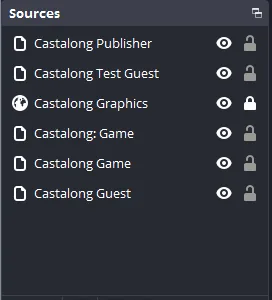
A native control dock, added by the plugin itself, and your guests as native OBS sources. Run the whole show without leaving OBS.
Co-stream sync delay
Hold an incoming feed back by up to 30 seconds, video and audio together, so a relayed program feed lines up with your own stream delay. OBS can't do this; Castalong can.
Record every guest
One click captures each guest to their own clean MP4, ready to download from your dashboard for the edit. No screen-recording, no lost takes.
Drive it from a Stream Deck
A simple control API maps a guest take, a cut or fade, or a recording to a physical button. Run the whole show on hardware, just like vMix.
Right inside OBS



What is Castalong?
Castalong is the easiest way to bring remote guests into OBS Studio. It pulls a remote collaborator's webcam, microphone, shared screen, a single window, or even a game with its audio straight into OBS as native OBS sources over WebRTC, so you can mix, switch, transform and filter them like any other source in your scene.
Your guests don't install anything. You send them a link, they open it in a normal browser (Chrome, Edge, Firefox or Safari, on a laptop or a phone), allow their camera and mic, and they're in your show. No downloads, no accounts, no port-forwarding, and no fiddling with NDI, Zoom window-capture or virtual cameras.
On your side, the Castalong plugin adds a vMix-style live switcher as a native dock inside OBS: take any guest to your program output with a cut or fade, add name lower-thirds, branding frames and tickers that follow each guest, record every guest to their own clean file, talk back to them privately, and even drive the whole show from a Stream Deck.
Who is it for?
Anyone who streams or records with other people: remote interviews and podcasts, talk shows and panels, co-streams and watch parties, remote game co-op and reaction streams, church and event production, and any REMI / remote-production workflow where the talent isn't in the room with you.
Why use Castalong?
Most ways of getting a remote guest into a stream make you leave OBS for a cloud studio, wrestle with a DIY browser-source setup, or buy heavyweight production software. Castalong keeps you in OBS, keeps it effortless for your guests, and makes each guest a first-class OBS source.
Pros
- Stays inside OBS — keep your scenes, sources, filters and plugins; you never give up your production.
- Zero friction for guests — just a browser link: no install, no account, no port-forwarding.
- Guests are native OBS sources, not laggy browser-source hacks, so you can crop, filter, key and switch them like anything else.
- Switcher, graphics, recording and talkback built in, all in one native OBS dock.
- Cross-platform — works with OBS on Windows and Linux; guests join from any modern browser.
- Free during the public beta.
Cons & things to know
- It's a hosted service — guest media is relayed through Castalong's servers, which is also what makes it work reliably across firewalls and strict NATs.
- It's in beta — features are still landing and it isn't yet battle-tested at large scale; there's no SLA yet.
- The streamer installs a one-time OBS plugin (your guests still install nothing).
- It's focused on remote guests, not a full broadcast suite — no instant replay, virtual sets or NDI matrix like the big paid tools.
- Pricing is coming — the core stays generous, with extras like multiple rooms on paid tiers later.
Castalong vs OBS, vMix and the others
How bringing remote guests into a stream compares across the common options.
| Castalong | OBS alone | vMix | VDO.Ninja | Cloud studios (StreamYard, etc.) | |
|---|---|---|---|---|---|
| Remote guests into OBS | Yes, native sources | No | Via vMix Call | Browser source | No (you leave OBS) |
| Guests join in a browser, no install | Yes | — | Yes | Yes | Yes |
| Guests become native OBS sources | Yes | — | No (separate app) | No (browser source) | No |
| Live switcher inside OBS | Yes, native dock | Scenes only | Yes, own app | No | In their web app |
| Graphics that follow each guest | Yes | Manual | Yes | Manual | Basic |
| Per-guest recording | Yes, server-side | No | Yes, local | No | Some |
| Runs on | OBS, Win + Linux | Win / Mac / Linux | Windows only | Browser + OBS | Browser |
| Price | Free (beta) | Free | Paid | Free / open-source | Freemium / subscription |
| Self-host option | Hosted | — | — | Yes | No |
Frequently asked questions
How do I add a remote guest to OBS?
Install the Castalong plugin in OBS, paste your room's Config URL into the dock, and send your guest their link. They open it in a browser and allow their camera and mic, and they show up in OBS as a native source you can take live with a cut or fade — no NDI, virtual camera or window-capture workarounds.
Do my guests need to install anything or make an account?
No. Guests join from a normal browser on a laptop or phone with just a link. Nothing to download, no account to create, and no port-forwarding.
Is Castalong a free alternative to vMix?
For getting remote guests into your show, yes. Castalong is free during the public beta, runs inside OBS on Windows and Linux, and gives you a vMix-style switcher dock plus on-screen graphics and per-guest recording. vMix is a paid, Windows-only full production suite; Castalong is lighter and focused on remote guests, living inside the OBS you already use.
How is it different from VDO.Ninja (OBS.Ninja)?
VDO.Ninja is a free, very flexible DIY tool where each remote feed becomes a browser source you wire up yourself with URL parameters. Castalong is a managed service that turns each guest into a real native OBS source and adds a built-in switcher, graphics, recording, talkback and accounts/rooms, so there's far less to set up and keep working.
How is it different from StreamYard, Riverside or Restream Studio?
Those are cloud studios: you produce inside their web app and give up OBS. Castalong keeps you in OBS with all your scenes, sources, filters and plugins, and brings the guests to you.
Can I bring in a guest's screen or a game with its audio?
Yes. A guest can share their webcam, mic, a whole screen, a single window, or a game with its audio, and each becomes its own OBS source. One guest can send a facecam and a game feed at the same time.
Does it work on Windows and Linux?
The Castalong plugin runs in OBS Studio on Windows and Linux today. Guests can join from any modern browser on any operating system, including phones.
Can I record each remote guest separately?
Yes. Castalong can record every guest to their own clean file server-side, ready to download from your dashboard for editing a podcast or interview later, with no extra load on your stream.
Do I need to open firewall ports or port-forward?
No. Connections use WebRTC and are relayed through Castalong's servers when needed, so it works across firewalls and strict NATs with no port-forwarding on either side.
Is Castalong really free?
Yes, it's free to use during the public beta. Pricing tiers will come later, but the core remote-guest workflow is designed to stay generous; extras like running multiple rooms will be paid options.
 Joining a show?
Use the link your host sent you. It opens the guest page and drops you straight into their room.
Joining a show?
Use the link your host sent you. It opens the guest page and drops you straight into their room.
Stay in the loop
Castalong is in public beta and free to use — create your account and bring your first guest into OBS in minutes. Want product updates instead? Leave your email and we'll tell you what's new. No spam.